Welcome one and all to our brand new home of all of our written and video tutorial documentation for all things Webtron!
The Webtron Guide Base is the perfect spot for you to learn the ins and outs of the Webtron Dashboard, find answers for any and all questions you might have about your Portal, and embrace the power of Webtron’s entire toolset.
Each Guide contains written and visual instructions on each major feature of the Webtron Dashboard, your Portal, Vendor+, and our integrations with third-party services like Calendly, Simplybook.me, YouTube, Xero, and much more!
If you’re new to the Webtron suite or just need a quick refresher, we’ve put together this Essentials pack to get you up and running with just the bare essentials.
If you get stuck at any point, you can ask our helpful AI Chatbot to break down each topic or email us at support@webtronoa.com to arrange some 1-on-1 training.
But wait, how does the Guide Base work?
Good question, at the top of each page is our Guide search bar, you can type out questions or the name of a topic and it will offer you guides related to your search.
Each Guide is also part of Chapters, these will appear next to each guide on the left-hand side of the page, listing each of the Guides that appear in that particular Chapter.
Each Guide is also broken down into Contents, like a Wikipedia page. The Contents list will appear on the right-hand side of the page, and will also follow you down as you read, so you can skip ahead or return to earlier sections of the Guide whenever you need to.
How do the Tutorial Videos work? Can I watch them while I use the Dashboard or Vendor+?
That’s a suspiciously specific question but the good news is yes, you can. At the start of each Guide, you’ll find a video tutorial that walks you through the exact same steps the written guide covers.
The Video Tutorials have also been enhanced and updated, you can now click this Icon:
And the video will float over your browser, meaning you can pause, play, rewind or fast forward the video whilst using the Webtron Dashboard or any other page and application.
Here’s a quick video explaining how Guide Base videos work:
Can I make the text bigger without zooming in on the page?
That is a definite yes. There’s a handy control panel at the top-right of every Guide that will follow you down the page as you read, the top option in the control panel is some text size controls, you can make the text smaller, bigger, or reset it back to it’s normal size.
GIF HERE
Can I save the Guides in case I don’t have access to stable internet?
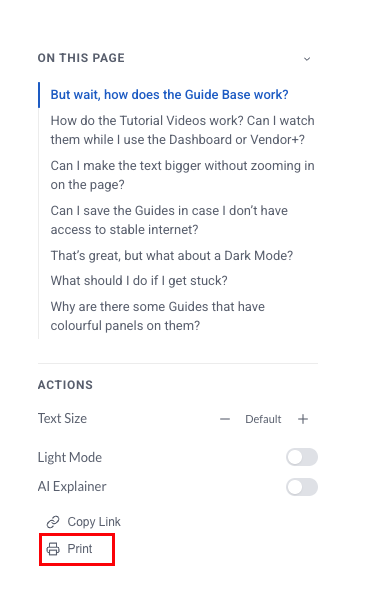
Sure can, each Guide comes complete with a Print button on desktop, right here:
This allows you to print the guide directly from your chosen printer or Save it as a PDF for offline viewing!
GIF showing the print function here.
That’s great, but what about a Dark Mode?
That does sound like a great idea and definitely not foreshadowing any other similar upgrade, but the Guide Base does feature a Light Mode and Dark Mode toggle here:
We should probably add that somewhere else too, probably. Maybe.
What should I do if I get stuck?
Our 24/7 AI Chatbot is on standby at the bottom-right of every page here on the Guide Base and inside the Dashboard, but if you need further assistance, email us at support@webtronoa.com and we’ll get back to you as soon as possible.
Why are there some Guides that have colourful panels on them?
We call these Info Panels, if we need to call attention to a specific element of a guide, you’ll see one of four different variations. Blue panels are our main Information Panel, they’ll contain snapshot information about a particular feature or part of a Guide.
Green is our friendly Information Panel, these will contain useful feature announcements.
Yellow is our “Heads Up” Panel, these will contain useful advice or notices about common errors and pitfalls with features or options.
Red is our Warning Panel, these will contain essential information regarding any known issues or warnings about feature limitations.
Did the Webtron AI Chatbot just talk to me?
It did indeed, the AI Chatbot can now convert the answers it gives you from text to speech, giving you an easy way to listen to the instructions or advice it offers up.
Welcome to the Webtron Guide Base
Welcome one and all to our brand new home of all of our written and video tutorial documentation for all things Webtron!
The Webtron Guide Base is the perfect spot for you to learn the ins and outs of the Webtron Dashboard, find answers for any and all questions you might have about your Portal, and embrace the power of Webtron’s entire toolset.
Each Guide contains written and visual instructions on each major feature of the Webtron Dashboard, your Portal, Vendor+, and our integrations with third-party services like Calendly, Simplybook.me, YouTube, Xero, and much more!
If you’re new to the Webtron suite or just need a quick refresher, we’ve put together this Essentials pack to get you up and running with just the bare essentials.
If you get stuck at any point, you can ask our helpful AI Chatbot to break down each topic or email us at support@webtronoa.com to arrange some 1-on-1 training.
But wait, how does the Guide Base work?
Good question, at the top of each page is our Guide search bar, you can type out questions or the name of a topic and it will offer you guides related to your search.
Each Guide is also part of Chapters, these will appear next to each guide on the left-hand side of the page, listing each of the Guides that appear in that particular Chapter.
Each Guide is also broken down into Contents, like a Wikipedia page. The Contents list will appear on the right-hand side of the page, and will also follow you down as you read, so you can skip ahead or return to earlier sections of the Guide whenever you need to.
How do the Tutorial Videos work? Can I watch them while I use the Dashboard or Vendor+?
That’s a suspiciously specific question but the good news is yes, you can. At the start of each Guide, you’ll find a video tutorial that walks you through the exact same steps the written guide covers.
The Video Tutorials have also been enhanced and updated, you can now click this Icon:
And the video will float over your browser, meaning you can pause, play, rewind or fast forward the video whilst using the Webtron Dashboard or any other page and application.
Here’s a quick video explaining how Guide Base videos work:
Can I make the text bigger without zooming in on the page?
That is a definite yes. There’s a handy control panel at the top-right of every Guide that will follow you down the page as you read, the top option in the control panel is some text size controls, you can make the text smaller, bigger, or reset it back to it’s normal size.
GIF HERE
Can I save the Guides in case I don’t have access to stable internet?
Sure can, each Guide comes complete with a Print button on desktop, right here:
This allows you to print the guide directly from your chosen printer or Save it as a PDF for offline viewing!
GIF showing the print function here.
That’s great, but what about a Dark Mode?
That does sound like a great idea and definitely not foreshadowing any other similar upgrade, but the Guide Base does feature a Light Mode and Dark Mode toggle here:
We should probably add that somewhere else too, probably. Maybe.
What should I do if I get stuck?
Our 24/7 AI Chatbot is on standby at the bottom-right of every page here on the Guide Base and inside the Dashboard, but if you need further assistance, email us at support@webtronoa.com and we’ll get back to you as soon as possible.
Why are there some Guides that have colourful panels on them?
We call these Info Panels, if we need to call attention to a specific element of a guide, you’ll see one of four different variations. Blue panels are our main Information Panel, they’ll contain snapshot information about a particular feature or part of a Guide.
Green is our friendly Information Panel, these will contain useful feature announcements.
Yellow is our “Heads Up” Panel, these will contain useful advice or notices about common errors and pitfalls with features or options.
Red is our Warning Panel, these will contain essential information regarding any known issues or warnings about feature limitations.
Did the Webtron AI Chatbot just talk to me?
It did indeed, the AI Chatbot can now convert the answers it gives you from text to speech, giving you an easy way to listen to the instructions or advice it offers up.